So I was put on hold while someone tracked down some information for me with a nice Canadian company, and was delighted to hear this song:
Not only is a Jack Johnson (which is always a win), but could just be the best hold music ever (the lyrics help.)
Tuesday, December 30, 2014

Thursday, December 19, 2013
Wednesday, November 13, 2013
How to Select Windows 7 Version on Install
Here's a quick tip for making sure you can select which version of Windows 7 you want to install on a system. This is especially useful if you have multiple keys for different OS versions (Home Premium, Professional, etc.)
If you look in the /sources/ folder (either in the .iso or on the media), look for a file ei.cfg. If this file does not exist, the Windows setup will allow the user to select the OS version to install. If the file exists, it will specify which version the installer will use by default. The file will look like:
[EditionID]
Ultimate
[Channel]
Retail
[VL]
0
From here, you can either edit the file to use your desired version by default, or simply remove the file to give yourself the option later. Doing either of these is quite simple if the iso had already been copied to a bootable USB. Otherwise, you will need to use an .iso editing tool to make the change. Good luck!
Source
If you look in the /sources/ folder (either in the .iso or on the media), look for a file ei.cfg. If this file does not exist, the Windows setup will allow the user to select the OS version to install. If the file exists, it will specify which version the installer will use by default. The file will look like:
[EditionID]
Ultimate
[Channel]
Retail
[VL]
0
From here, you can either edit the file to use your desired version by default, or simply remove the file to give yourself the option later. Doing either of these is quite simple if the iso had already been copied to a bootable USB. Otherwise, you will need to use an .iso editing tool to make the change. Good luck!
Source
Downgrading Versions of Windows 7
Have you ever needed to downgrade a version in Windows 7? Let's say you have installed Windows 7 Professional (or Ultimate?) on a system, only to grab the key and realize it is a key for a lesser version of the OS (say, Windows 7 Home Premium.) I ran into this very situation today. And downgrading to a less-fully featured version can be difficult to figure out without some help. Thankfully I found just the right hack I needed to make it work, and it is a relatively simple and painless process. I borrow shamelessly from aquasystems :
here is a “simple” hack which allows you to embed the downgrade procedure in Windows 7.
Click Start.
In the Search Box, type regedit and press Enter.
Navigate to this registry key: HKEY_LOCAL_MACHINE\Software\ Microsoft\ Windows NT\CurrentVersion
In the right pane, click EditionID and ProductName and give them the value which corresponds to a lower Windows 7 edition. Here is an example:
Windows 7 Home Premium (downgrade from Windows 7 Ultimate to Windows 7 Home Premium)
EditionID: HomePremium
ProductName: Windows 7 HomePremium
Start your Windows 7 installation by inserting your Windows 7 Disc.
Now, Select Upgrade as type of installation. Follow the instruction on the screen.
Reactivate your operating system.
Voila! I give you, the Windows 7 downgrade. It worked like a charm. Thanks aqua!
here is a “simple” hack which allows you to embed the downgrade procedure in Windows 7.
Click Start.
In the Search Box, type regedit and press Enter.
Navigate to this registry key: HKEY_LOCAL_MACHINE\Software\ Microsoft\ Windows NT\CurrentVersion
In the right pane, click EditionID and ProductName and give them the value which corresponds to a lower Windows 7 edition. Here is an example:
Windows 7 Home Premium (downgrade from Windows 7 Ultimate to Windows 7 Home Premium)
EditionID: HomePremium
ProductName: Windows 7 HomePremium
Start your Windows 7 installation by inserting your Windows 7 Disc.
Now, Select Upgrade as type of installation. Follow the instruction on the screen.
Reactivate your operating system.
Voila! I give you, the Windows 7 downgrade. It worked like a charm. Thanks aqua!
Tuesday, October 8, 2013
Fixing TeXWorks Spell Checking in Ubuntu 12.04
If you've installed TeXworks on Ubuntu (esp. 12.04 or later), you may have noticed that while there were spell check options for Australian English and British English, it was impossible to find the option for American English. Well, fret no more! Try this handy dandy solution, and see if it doesn't fix all your ails (or at least this one...)
sudo apt-get install myspell-en-us
Did this work for you?
Thanks to source
sudo apt-get install myspell-en-us
Did this work for you?
Thanks to source
Saturday, August 31, 2013
An Ode to Pens
So, I'm always on the lookout for a good pen. I don't know about you, but I'm very particular about my pen. I'm like Goldilocks. This ink is too runny, this ink is too light, this pen looks silly, etc. etc. etc. Every now and then I'll find a really great pen, and that happens to be the one that decides to explode in my pocket.
I have been collecting awesome-looking pens (or pen holders really, designed to use ink refills) for some time. Here's the list I've gathered so far:


The Pen Project:
http://www.kickstarter.com/projects/894128597/the-pen-project
Render K Pen:
http://karaskustoms.com/pens/render-k.html
Pen Type-A:
http://shop.cwandt.com/products/pen-type-a
The Bolt:
http://karaskustoms.com/pens/the-bolt.html
The only real question on my mind is how do they actually write. Anyone use these pens? Have any other good pen recommendations? Let me know!
I have been collecting awesome-looking pens (or pen holders really, designed to use ink refills) for some time. Here's the list I've gathered so far:
The Pen Project:
http://www.kickstarter.com/projects/894128597/the-pen-project
Render K Pen:
http://karaskustoms.com/pens/render-k.html
Pen Type-A:
http://shop.cwandt.com/products/pen-type-a
The Bolt:
http://karaskustoms.com/pens/the-bolt.html
The only real question on my mind is how do they actually write. Anyone use these pens? Have any other good pen recommendations? Let me know!
Fixing Broadcom Wireless Issues in Ubuntu 12.04 LTS
If you've ever seen this error:
2012-04-27 14:04:43,723 WARNING: modinfo for module wl failed: ERROR: modinfo: could not find module wl
2012-04-27 14:04:43,724 WARNING: /sys/module/wl/drivers does not exist, cannot rebind wl driver
well, you might have a problem with your Broadcom wireless driver. Or rather, Ubuntu has a problem. I found several possible solutions here and here.
First, try:
sudo apt-get remove --purge bcmwl-kernel-source
If that doesn't work, try:
sudo apt-get install firmware-b43-installer
or even:
sudo modprobe b43
If none of this works, check the second link for more suggestions.
2012-04-27 14:04:43,723 WARNING: modinfo for module wl failed: ERROR: modinfo: could not find module wl
2012-04-27 14:04:43,724 WARNING: /sys/module/wl/drivers does not exist, cannot rebind wl driver
well, you might have a problem with your Broadcom wireless driver. Or rather, Ubuntu has a problem. I found several possible solutions here and here.
First, try:
sudo apt-get remove --purge bcmwl-kernel-source
If that doesn't work, try:
sudo apt-get install firmware-b43-installer
or even:
sudo modprobe b43
If none of this works, check the second link for more suggestions.
Wednesday, August 28, 2013
Merging files with mkvmerge
In a follow-on to my previous post, I have a method for merging media files back together. After searching for a long (LONG) time for an easy, efficient way to do this (that was at least as easy and efficient as the previous method for splitting), I finally came across mkvmerge. This tool is part of the mkvtoolnix package for working with Matroska (.mkv) files.
mkvmerge can handle many different file type formats. For simply appending media files together, the syntax is:
mkvmerge -o output.mkv input1 + input2
And voilà! So, do you have a different/better way to create media files? Let's hear it!
mkvmerge can handle many different file type formats. For simply appending media files together, the syntax is:
mkvmerge -o output.mkv input1 + input2
And voilà! So, do you have a different/better way to create media files? Let's hear it!
Friday, July 19, 2013
Extract PDF Page and Page Ranges (Oh Yeah, and Merge Them Together Again) Using pdftk in Ubuntu
So, following up on the previous thread about using pdftk to rotate pdf's, here is a follow-up for those times you need to get a single page of a range of pages from a larger PDF document.
First, install pdftk:
$ sudo apt-get install pdftk
For example, to extract pages 22-36 from a 100-page PDF file using pdftk:
$ pdftk A=100p-inputfile.pdf cat A22-36 output outfile_p22-p36.pdf
When you invariably need to put them back into a single large document again, just:
$ pdftk in1.pdf in2.pdf cat output out1.pdf
To more fun ways you can use pdftk, check out the website examples page.
First, install pdftk:
$ sudo apt-get install pdftk
For example, to extract pages 22-36 from a 100-page PDF file using pdftk:
$ pdftk A=100p-inputfile.pdf cat A22-36 output outfile_p22-p36.pdf
When you invariably need to put them back into a single large document again, just:
$ pdftk in1.pdf in2.pdf cat output out1.pdf
To more fun ways you can use pdftk, check out the website examples page.
Monday, June 17, 2013
Happy Father's Day
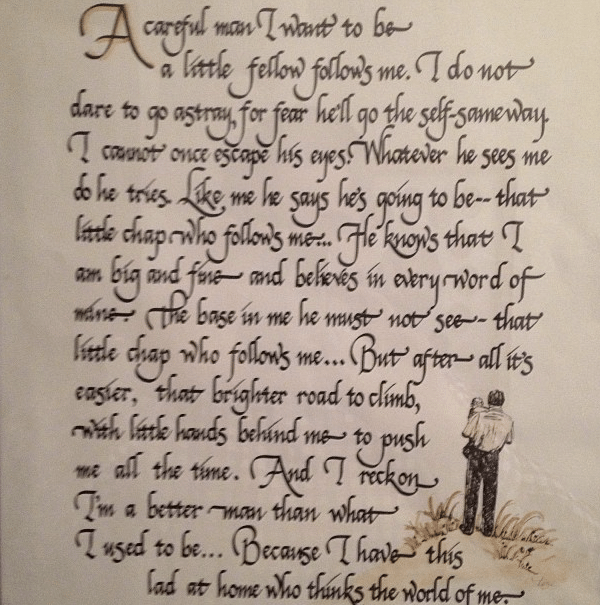
A careful man I want to be –
a little fellow follows me.
I do not dare to go astray,
for fear he’ll go the self-same way.
I cannot once escape his eyes.
Whatever he sees me do he tries.
Like me he says he’s going to be –
that little chap who follows me…
He knows that I am big and fine –
And believes in every word of mine.
The base in me he must not see –
that little chap who follows me…
But after all it’s easier,
that brighter road to climb,
With little hands behind me –
to push me all the time.
And I reckon I’m a better man
than what I used to be…
Because I have this lad at home
who thinks the world of me.
I found this poem on ArtofManliness.com, and it really hit home. Variously attributed to Rev. Claude Wisdom White, Sr. and Anonymous. Happy Father's Day!
Saturday, June 15, 2013
I finally found it
After 10 years of agonizing, I finally found it, thanks to one single comment on a random Youtube video that Google happened to pick up on. The song that has perpetually been stuck in my head for the last 10 years, since I first heard it as a missionary, has finally been discovered. Nauvoo, by Mark Geslison and Angela Soffe (also), on the For the Beauty of the Earth (Amazon) cd.
Apparently, someone had heard someone sing the song on a Youtube video of a family reunion (starts at 18:36), and made a comment about it on another Youtube video, and the people subsequently posted a video of them singing the entire song, and referenced the original. Thank you Niamh Conway (and Vince Crofts)!

Apparently, someone had heard someone sing the song on a Youtube video of a family reunion (starts at 18:36), and made a comment about it on another Youtube video, and the people subsequently posted a video of them singing the entire song, and referenced the original. Thank you Niamh Conway (and Vince Crofts)!
Tuesday, June 11, 2013
The Wyndham Estate (not the wine)
So, I'll admit to you one of my guilty pleasure... really nice houses. I don't know why, but I really like really nice houses.
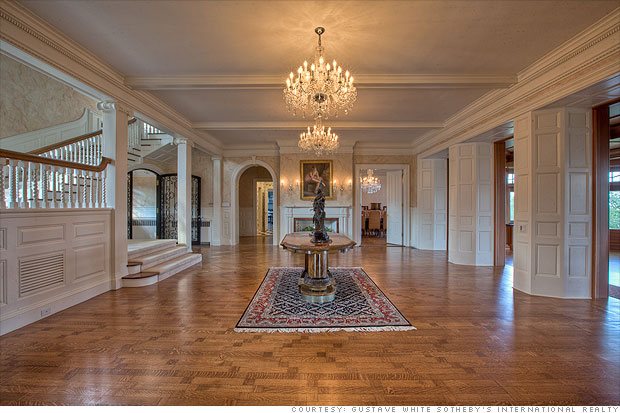
One of my favorites (my absolute favorite) is the Wyndham Estate in Newport (apparently you have to include the Newport part when you talk about it, because there is a famous Australian wine with the same name.) I found it in an article on CNN about ridiculously expensive foreclosures. Here's a run down from the article:
Asking price: $7.9 million
This sprawling estate is a throwback to the Gilded Age -- just with all new appliances. Originally built in 1891, the estate was foreclosed on last year and then renovated by one of its lien holders. It was listed last summer for $7.9 million and remains on the market.
There are 7 bedrooms, 7 1/2 bathrooms, a ballroom, music room and a library. Located at the highest point in Newport, there are impressive views of the ocean and -- on a clear day -- Martha's Vineyard, from the rooftop deck. The property also includes 7 acres of manicured lawn and an extra lot with an additional lot available.
The house + grounds remind me of the English countryside (think Downton Abbey).
Will I ever be able to afford it? No. Do I really want to live in Newport? Probably not. But come on, this place is just awesome.




One of my favorites (my absolute favorite) is the Wyndham Estate in Newport (apparently you have to include the Newport part when you talk about it, because there is a famous Australian wine with the same name.) I found it in an article on CNN about ridiculously expensive foreclosures. Here's a run down from the article:
Asking price: $7.9 million
This sprawling estate is a throwback to the Gilded Age -- just with all new appliances. Originally built in 1891, the estate was foreclosed on last year and then renovated by one of its lien holders. It was listed last summer for $7.9 million and remains on the market.
There are 7 bedrooms, 7 1/2 bathrooms, a ballroom, music room and a library. Located at the highest point in Newport, there are impressive views of the ocean and -- on a clear day -- Martha's Vineyard, from the rooftop deck. The property also includes 7 acres of manicured lawn and an extra lot with an additional lot available.
The house + grounds remind me of the English countryside (think Downton Abbey).
Will I ever be able to afford it? No. Do I really want to live in Newport? Probably not. But come on, this place is just awesome.
Move Chrome Window Buttons in Ubuntu
I love Cinnamon. The desktop environment (well, ok, the spice too.) But one of the things that has bugged me is that in almost all windows I can move the window controls (max, min, close) to either side I want. That is, all except for Chrome. Turns out, this is a common problem because Chrome draws its own windows controls based on some system settings. Here's how to turn things around:
To set the controls to the right side:
gconftool-2 --set /apps/metacity/general/button_layout --type string ":minimize,maximize,close"
To set them to the left:
gconftool-2 --set /apps/metacity/general/button_layout --type string "minimize,maximize,close:"
Source, and discussion
Thursday, June 6, 2013
Using PrimeSense Carmine 1.09 in ROS
If you're using the new PrimeSense Carmine 1.09 short range RGB+D sensor in ROS, you may run into a few issues. When I tried to run openni_launch with this sensor out of the box, I got the following error:
[ INFO] [1370531242.800201916]: Number devices connected: 1
[ INFO] [1370531242.800284555]: 1. device on bus 003:07 is a PrimeSense Device (601) from PrimeSense (1d27) with serial id ''
[ INFO] [1370531242.801449470]: Searching for device with index = 1
[ INFO] [1370531242.902652607]: No matching device found.... waiting for devices. Reason: openni_wrapper::OpenNIDevice::OpenNIDevice(xn::Context&, const xn::NodeInfo&, const xn::NodeInfo&, const xn::NodeInfo&, const xn::NodeInfo&) @ /tmp/buildd/ros-groovy-openni-camera-1.8.8-0precise-20130418-2203/src/openni_device.cpp @ 61 : creating depth generator failed. Reason: USB interface is not supported!
[ INFO] [1370531242.800201916]: Number devices connected: 1
[ INFO] [1370531242.800284555]: 1. device on bus 003:07 is a PrimeSense Device (601) from PrimeSense (1d27) with serial id ''
[ INFO] [1370531242.801449470]: Searching for device with index = 1
[ INFO] [1370531242.902652607]: No matching device found.... waiting for devices. Reason: openni_wrapper::OpenNIDevice::OpenNIDevice(xn::Context&, const xn::NodeInfo&, const xn::NodeInfo&, const xn::NodeInfo&, const xn::NodeInfo&) @ /tmp/buildd/ros-groovy-openni-camera-1.8.8-0precise-20130418-2203/src/openni_device.cpp @ 61 : creating depth generator failed. Reason: USB interface is not supported!
Thankfully I found this thread that deals with exactly the problem I was running into: being able to run the Asus Xtion Pro Live, but not the PrimeSense Carmine 1.09 short range sensor.
The answer provides a link to access updated OpenNI drivers that will allow you to access the data for this sensor (choose the OpenNI-Compliant Sensor Driver v5.1.2.1 for your OS). With these drivers installed I have been able to successfully run the Carmine without any other real issues.
Did this work for you? Let me know!
Tuesday, June 4, 2013
How to Use Linux Terminal Commands in Windows
Have you ever been using a Windows command prompt and been frustrated because you've forgotten those old DOS commands for navigation and file manipulation? Well, you're not alone. And I'm happy to announce that with a few short steps you could be happily using Linux command line commands at a DOS prompt near you. (Directions borrowed copiously from this awesome play-by-play tutorial here.)
Download Youtube Videos in Ubuntu Using youtube-dl
Need to download a Youtube video in Ubuntu? Whether it's laughing babies you want to watch offline, or that cat video you just must save for posterity, grabbing videos off of Youtube is a cinch with youtube-dl.
Simply open a terminal, type
sudo apt-get install youtube-dl
then
youtube-dl -U
and you're on your way to hours of offline Youtube delight.
Some helpful hints:
Any questions? Let me know!
Simply open a terminal, type
sudo apt-get install youtube-dl
then
youtube-dl -U
and you're on your way to hours of offline Youtube delight.
Some helpful hints:
- youtube-dl "http://www.youtube.com/watch?v=foobar". The video will be saved to the file foobar.flv
- To save the video with it's title as the file name, and the associated extension, try youtube-dl -o "%(title)s.%(ext)s" http://the_youtube_address
- Note: this also works with playlists
Any questions? Let me know!
Wednesday, May 29, 2013
ROS Topics Won't Publish?
This is for all of you ROS (Robot Operating System) users out there.
If your ROS topics won't publish, make sure that you subscribe to the topic AFTER it is advertised, otherwise it won't work. For example, if you have one program that is subscribed to an advertised topic, then the program advertising the topic is closed, the topic is unadvertised (right?). When this program runs again, and the topic re-advertised, it will not automatically reconnect with the program that was already subscribed to this topic - resubscribe!

If your ROS topics won't publish, make sure that you subscribe to the topic AFTER it is advertised, otherwise it won't work. For example, if you have one program that is subscribed to an advertised topic, then the program advertising the topic is closed, the topic is unadvertised (right?). When this program runs again, and the topic re-advertised, it will not automatically reconnect with the program that was already subscribed to this topic - resubscribe!
Monday, May 27, 2013
Subversion (SVN) Command Line Client for Windows
So you're looking for a way to work with Subversion (SVN) using the command line in Windows, huh? Well, whether you're looking for a more Linux-y feel, or just trying to impress your friends by using terminal in Windows, look no further than Slik SVN. It's easy to install, it's easy to use (just like any other SVN command line client you're used to), it... runs in a terminal. Yeah, there's really not much more to say about it. Check it out!
Interested in more Linux-y command line action in Windows? Check out my post!
Interested in more Linux-y command line action in Windows? Check out my post!
Friday, May 17, 2013
Can't play DVD's in Ubuntu? Try this...
So I ran into a problem the other day on a clean install of Ubuntu while trying to play a DVD - it didn't work. I did some looking, and found the answer pretty quickly.
Make sure you have either ubuntu-restricted-extras or libdvdread4 installed (sudo apt-get install ubuntu-restricted-extras)
Open a terminal and run: sudo /usr/share/doc/libdvdread4/install-css.sh
Ta-Da! A reboot might be necessary, but that should get you playing.
Source
Make sure you have either ubuntu-restricted-extras or libdvdread4 installed (sudo apt-get install ubuntu-restricted-extras)
Open a terminal and run: sudo /usr/share/doc/libdvdread4/install-css.sh
Ta-Da! A reboot might be necessary, but that should get you playing.
Source
Monday, May 13, 2013
Cowboy Cauldron
Ah, the Cowboy Cauldron. So, ever since I saw these on Huckberry, I've been completely sold. Love at first sight. Like I need one in my yard. Right. NOW.
Unfortunately, I currently don't have the cash to shell out for one of these little (er - not so little?) beauties, so this will have to do in the meantime.

Because everything's better in steel, right?

What's more refined that a flat cap, sheepskin gloves,
and a giant steel cauldron of fire? Irish countryside not included.

"Did you say you just cooked a cow? A cow cow??" Yes. Yes I did.

Which one do you prefer? Personally I find it difficult to resist the alluring call of the Ranch Boss, but what can I say? I like fire.
Source, Video
Unfortunately, I currently don't have the cash to shell out for one of these little (er - not so little?) beauties, so this will have to do in the meantime.
Because everything's better in steel, right?
What's more refined that a flat cap, sheepskin gloves,
and a giant steel cauldron of fire? Irish countryside not included.
"Did you say you just cooked a cow? A cow cow??" Yes. Yes I did.
Which one do you prefer? Personally I find it difficult to resist the alluring call of the Ranch Boss, but what can I say? I like fire.
Source, Video
$$$ Get Access to Your Flash Cache! - Windows 7 Edition!$$$
In a follow-up to my previous post, here is some info for accessing the Flash cache in Windows 7. When using Chrome, simply open a Windows file folder and navigate to
%LocalAppData%\Google\Chrome\User Data\Default\Pepper Data\Shockwave Flash\
and you should see your Flash media buffering here. Simply rename the *.tmp files to *.flv (or the container of your choice), and voilà! Enjoy with the media player of your choice (e.g. VLC and a nice Chianti.)
Did this work for you? Did I miss anything? Let me know!
%LocalAppData%\Google\Chrome\User Data\Default\Pepper Data\Shockwave Flash\
and you should see your Flash media buffering here. Simply rename the *.tmp files to *.flv (or the container of your choice), and voilà! Enjoy with the media player of your choice (e.g. VLC and a nice Chianti.)
Did this work for you? Did I miss anything? Let me know!
Friday, May 3, 2013
Can-Am Spyder Roadster - The Family Man's Motorcycle


Ode to the Hustler - Joey Roth
Yeah, not that Hustler. Designer Joey Roth designed a series of graphics for the first issue of 48 Hours Magazine, Hustle. What he came up with is pure genius.


Hustling is creating something from inspiration, mediated by an uncompromising picture of reality, then launching it with precision into the world.

Grind: Disciplined, incremental movement through reality towards a goal
Dream: A good idea that loses potency as it encounters reality
I have Huckberry to thank for this find. You can buy prints from Huckberry (while the offer lasts) or from Joey Roth's website.
Hustling is creating something from inspiration, mediated by an uncompromising picture of reality, then launching it with precision into the world.
Grind: Disciplined, incremental movement through reality towards a goal
Dream: A good idea that loses potency as it encounters reality
I have Huckberry to thank for this find. You can buy prints from Huckberry (while the offer lasts) or from Joey Roth's website.
Tuesday, April 30, 2013
Rip Cassette into MP3 with Ubuntu
http://askubuntu.com/questions/50447/app-that-will-rip-mp3s-from-an-analog-cassette-tape
So I've got a bunch of old cassette tapes that I've been wanting to listen to for a long time. I finally broke down and figured out how to rip the audio into an MP3 on my computer.
Now a bit of clean-up of the sound recorded.
To remove the tape-hiss choose from the Audacity Menu:
At this point, the source link tells you to use Gramofile to automatically split the big .wav file into individual tracks. I found this to be a huge waste of time, because it didn't do it all that well for my audio. Instead, I used Audacity.
And there you have it! Did it work for you as well as it did for me? Do you have any other tricks I'm missing? Let me know!
So I've got a bunch of old cassette tapes that I've been wanting to listen to for a long time. I finally broke down and figured out how to rip the audio into an MP3 on my computer.
- First, install Audacity and Sound Converter
- Plug in you jack into the appropriate sound-in / headphone socket in your laptop or PC sound card.
- On your tape, approximately forward to where you have the "loudest sound"
- Play your tape
- Using Audacity, press the record button
- Adjust the input levels so that the sound doesnt "clip"
- Stop recording and rewind the tape
- Choose from the Audacity Menu - Transport - Sound Activated Recording
- Play your tape and record until the end of the tape
Now a bit of clean-up of the sound recorded.
To remove the tape-hiss choose from the Audacity Menu:
- Effect - Normalize. This will adjust the approximate sound level through the entire track
- Effect - Noise Removal. This will remove some of the lower frequency sounds that is the tape hiss - just follow the two suggested steps on the window. Play with the results to get the best sound on your track.
- Finally, save the file as a .wav file.
At this point, the source link tells you to use Gramofile to automatically split the big .wav file into individual tracks. I found this to be a huge waste of time, because it didn't do it all that well for my audio. Instead, I used Audacity.
- Select the section of the audio for each track.
- Export the selection as a .wav file.
- Convert to MP3 using Sound Converter.
And there you have it! Did it work for you as well as it did for me? Do you have any other tricks I'm missing? Let me know!
Friday, April 19, 2013
Midnight Reverie - It's so good it's... shockolate? chocking?
So, my wife got a surprise for me at the store: Ghirardelli's Intense Dark 86% Cacao Midnight Reverie Bar. I decided to try it, and - wow. Blown away. Now, I'm much more a dark chocolate kinda person than milk chocolate, and this one was pretty dark. From the Tasting Notes: "The deep, full bodied flavor is noticeable upfront and evenly throughout with hints of dark cherries, dried plums, and a roasted flavor from the high cacao content." I think that description does it justice. If you're into dark, I definitely recommend it.

I found a great review of this chocolate, and in it some others that I would like to try in the future, among them the Lindt 90% and the Green & Black 85% bars. Any good ones I missed?
I found a great review of this chocolate, and in it some others that I would like to try in the future, among them the Lindt 90% and the Green & Black 85% bars. Any good ones I missed?
Tuesday, April 16, 2013
How to Do Simple Stuff From Command Line
Ubuntu Linux
to view images from the command line, try eog <filename>
to view pdf's from the command line, try evince <filename>
to scroll in a terminal window from the keyboard: [Shift] + PgUp/PgDn
Windows
to open an new terminal from the command line, try 'start' (with no quotes)
to open a file explorer window (at the current location) from the command line, try 'start .' (that's start-space-period, no quotes)
Know any other simple command line tricks? Let me know!
Monday, April 1, 2013
Fixing Flashing No-Boot for Ubuntu 12.04
So, I installed a clean Ubuntu 12.04 64-bit OS onto a new Dell XPS i7 that previously had Windows 8 UEFI, and had disastrous results. After hours of work, I was finally able to get it working (yay!) Here's what I had to do...
First, make sure you get into the BIOS and turn of the Secure Boot.
Once this was done, I was able to boot the Ubuntu LiveCD (USB?) from by handy USB flash drive, and easily install the OS. This was where the fun really started. Upon reboot, the system would occasionally boot to the login screen, flickering violently, with the screen split in half. Logging in only left me with the blank background (no icons, nothing except a mouse) that kept flashing. This seizure-fest was only for special occasions, however, as most of the time it would boot and sit at a blank screen.
Once I was able to get the GRUB boot menu to come up (thanks to boot-repair), I was able to log into the rescue mode. Starting in low-graphics mode led to more issues, and it hung with
ath: phy0: TX while HW is in FULL_SLEEP mode
Well, it looked like this could be caused by the wireless, which had been giving me a headache during install. (Seriously, the 2nd desktop with WIFI I've had trouble with lately - what's the deal?) So, I got into command line mode and:
did the trick (the ifconfig's are just to check that it worked.) Reboot, try again, back to (most likely) the real problem - the graphics driver. This time the errors included:
swapon failed: Device or resource busy
and
initctl: Event failed
I checked my graphics card
lspci -v | less
and jockey-text did the rest. (Source)
Use
to get a list of available drivers and their status, then use
where DRIVER is the one you got from the list. For example, to install the Broadcom B43 wireless driver:
Once I switched over to the best video driver for my graphics card, I was a reboot away from a happy system (finally!)
First, make sure you get into the BIOS and turn of the Secure Boot.
Once this was done, I was able to boot the Ubuntu LiveCD (USB?) from by handy USB flash drive, and easily install the OS. This was where the fun really started. Upon reboot, the system would occasionally boot to the login screen, flickering violently, with the screen split in half. Logging in only left me with the blank background (no icons, nothing except a mouse) that kept flashing. This seizure-fest was only for special occasions, however, as most of the time it would boot and sit at a blank screen.
Once I was able to get the GRUB boot menu to come up (thanks to boot-repair), I was able to log into the rescue mode. Starting in low-graphics mode led to more issues, and it hung with
ath: phy0: TX while HW is in FULL_SLEEP mode
Well, it looked like this could be caused by the wireless, which had been giving me a headache during install. (Seriously, the 2nd desktop with WIFI I've had trouble with lately - what's the deal?) So, I got into command line mode and:
ifconfig

nmcli nm wifi off

ifconfig
did the trick (the ifconfig's are just to check that it worked.) Reboot, try again, back to (most likely) the real problem - the graphics driver. This time the errors included:
swapon failed: Device or resource busy
and
initctl: Event failed
I checked my graphics card
lspci -v | less
and jockey-text did the rest. (Source)
Use
jockey-text --listto get a list of available drivers and their status, then use
# the init lines are required only for graphics drivers

sudo init 1

jockey-text --enable=DRIVER

sudo init 2
where DRIVER is the one you got from the list. For example, to install the Broadcom B43 wireless driver:
jockey-text --enable=firmware:b43
Once I switched over to the best video driver for my graphics card, I was a reboot away from a happy system (finally!)
Thursday, January 3, 2013
Windows 7 Motorola Drivers - Charge your Motorola Phone in Windows!
Ever needed to charge your Motorola phone in Windows, but poor Windows just can't find the drivers? Well, look no further! Try these drivers, see if they work!
Tuesday, January 1, 2013
How to use ffmpeg to split a video
Have you ever needed to take a clip from a larger video file to use in a presentation, post to youtube, or to show awesome classic Christmas cartoons to your kids? Well, whatever the reason, here is a simple command to make it happen in Ubuntu, thanks to your friend, ffmpeg.
"where START is starting positing in seconds or in format hh:mm:ss LENGTH is the chunk length in seconds or in format hh:mm:ss
So you will need to run this command few times depending on how long your video. If let's say your video is 31 minutes long and you want so split into 15 min chunks here is how you run it:"
Source
ffmpeg -acodec copy -vcodec copy -ss START -t LENGTH -i ORIGINALFILE.mp4 OUTFILE.mp4
"where START is starting positing in seconds or in format hh:mm:ss LENGTH is the chunk length in seconds or in format hh:mm:ss
So you will need to run this command few times depending on how long your video. If let's say your video is 31 minutes long and you want so split into 15 min chunks here is how you run it:"
ffmpeg -acodec copy -vcodec copy -ss 0 -t 00:15:00 -i ORIGINALFILE.mp4 OUTFILE-1.mp4


ffmpeg -acodec copy -vcodec copy -ss 00:15:00 -t 00:15:00 -i ORIGINALFILE.mp4 OUTFILE-2.mp4


ffmpeg -acodec copy -vcodec copy -ss 00:30:00 -t 00:15:00 -i ORIGINALFILE.mp4 OUTFILE-3.mp4
Source
Saturday, November 24, 2012
A Day in the Life - Einstein's Office

So apparently this is a picture of Einstein's office, as he left it, on the day he died. The source link has a nice article. RIP Mr. Einstein.
Source
Subscribe to:
Posts (Atom)